
Building an Agentic AI Support System: What It Takes
Categories
- Agentic AI (14)
- AI (1)
- AI & Automation (3)
- AI & Technology (1)
- AI Adoption (1)
- AI Automation (9)
- AI Business Solutions (1)
- AI Consulting (1)
- AI Costs & Pricing (1)
- AI Development (3)
- AI Framework (1)
- AI Governance & Compliance (1)
- AI in Enterprise (3)
- AI Services Canada (1)
- AI Strategy (2)
- AI Use Cases (1)
- AI/ML Services (1)
- Artificial Intelligence (7)
- Artificial Intelligence Canada (2)
- Best AI Agents in 2026 (2)
- Business Automation (2)
- Business Technology (4)
- Business Technology Canada (1)
- Canada Tech & Business (3)
- Case Studies (1)
- Cloud Computing (1)
- CRM Automation (1)
- Custom Development (2)
- Custom Software Development (2)
- Custom Software Development Company (2)
- Customer Support (2)
- DevOps (1)
- Devops & Cloud Services (1)
- DevOps Services (1)
- Digital Transformation (5)
- ERP Technology (3)
- Hiring Guide (1)
- Industry Insights (2)
- Kubernetes (1)
- LLM Integration services (1)
- Local Business Guides (1)
- Machine Learning (1)
- Ontario Tech (1)
- Productivity (1)
- Python Development (1)
- RAG AI Framework (1)
- Software Development (2)
- Software Engineering (1)
- Tech Product Pricing (1)
- Web Development (1)
Recent Posts
- All Posts
- Agentic AI
- agentic AI customer support
- AI
- AI & Automation
- AI & Technology
- AI Adoption
- AI Automation
- AI Business Solutions
- AI Consulting
- AI Costs & Pricing
- AI Development
- AI Framework
- AI Governance & Compliance
- AI in Enterprise
- AI Services Canada
- AI Strategy
- AI Use Cases
- AI/ML Services
- Artificial Intelligence
- Artificial Intelligence Canada
- Best AI Agents in 2026
- Business Automation
- Business Technology
- Business Technology Canada
- Canada Tech & Business
- Case Studies
- Cloud Computing
- CRM Automation
- Custom Development
- Custom Software Development
- Custom Software Development Company
- Customer Support
- DevOps
- Devops & Cloud Services
- DevOps Services
- Digital Transformation
- ERP Technology
- Hiring Guide
- Industry Insights
- Kubernetes
- LLM Integration services
- Local Business Guides
- Machine Learning
- Ontario Tech
- Productivity
- Python Development
- RAG AI Framework
- Software Development
- Software Engineering
- Tech Product Pricing
- Web Development
- Back
- Generative AI


Author: Python Technologies Date: 08/14/2026
An agentic AI support system is an AI-powered customer service architecture that can understand a request, plan multiple steps, use business tools, evaluate results, and escalate when human intervention is required. The major components that make this possible work together as a pipeline:
LLM reasoning → memory → tools/APIs → agent orchestration → knowledge retrieval → security guardrails → monitoring → human oversight.
For Canadian businesses, production deployment also requires attention to data governance, privacy, security, cloud infrastructure, integration with existing systems, and operational scalability. Getting these pieces right is what separates a working demo from a system your support team can actually rely on, and it’s the difference between AI adoption in technology sectors that sticks and pilot projects that quietly get shelved.
What Is an Agentic AI Support System?
An agentic AI support system is a step beyond a conversational assistant. Rather than only answering questions, it reasons about a request, decides what needs to happen, calls the tools required to make that happen, checks whether the outcome was correct, and escalates to a person when it isn’t confident. This is the essence of agentic AI: autonomous AI agents that combine language understanding with the ability to act.
It’s worth being precise about how this differs from the tools most support teams already have:
- A rule-based chatbot follows scripted if/then logic. It’s predictable but brittle, and it can’t handle anything outside its decision tree.
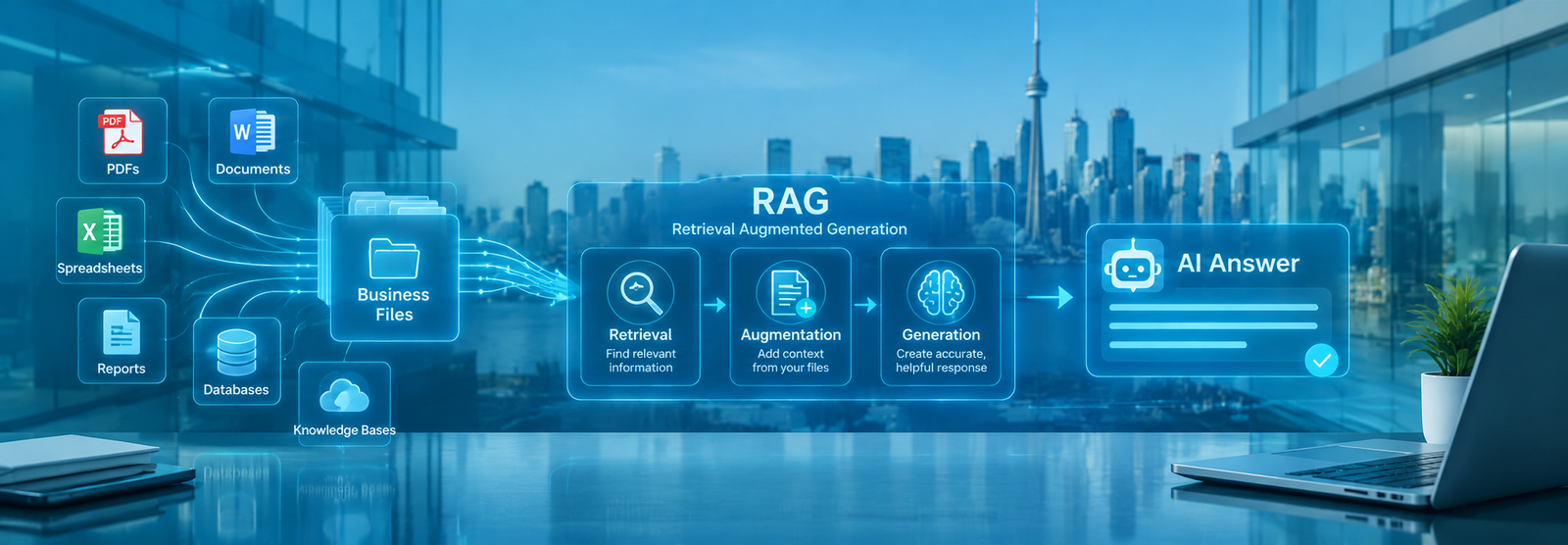
- A RAG (retrieval-augmented generation) chatbot improves on this by pulling relevant documents into its answers, but it still mainly answers — it doesn’t act.
- An AI assistant can hold a more natural conversation and sometimes trigger a single action, but multi-step reasoning is limited.
- Agentic AI combines reasoning, tool use, and multi-step planning, so it can investigate an issue, take an action such as issuing a refund or updating a record, verify the result, and loop in a human when the situation calls for it.
System | Answers | Reasons | Takes Actions | Multi-Step |
Rule-based chatbot | ✓ | Limited | Limited | No |
RAG chatbot | ✓ | Limited | Limited | Limited |
AI assistant | ✓ | ✓ | Some | Limited |
Agentic AI | ✓ | ✓ | ✓ | ✓ |
This table is a useful shorthand for anyone comparing agentic AI and rule-based systems, or trying to understand where AI agents for customer service sit relative to intelligent customer support tools they may already have deployed.
Agentic AI vs Traditional Customer Support Automation
To understand why agentic AI is generating so much attention in AI customer support automation circles, it helps to line up the three approaches side by side.
Rule-Based Systems
Rule-based systems operate on explicit if/then workflows: if the customer says “refund,” route to the refund flow; if they say “cancel,” route to cancellation. These systems are transparent and easy to audit, but they break the moment a request doesn’t match a predefined path, and maintaining the rule tree becomes harder as the business grows.
Traditional AI Chatbots
Conversational chatbots, including most RAG-based assistants, are good at question-answering. They can search a knowledge base and produce a fluent response, but they generally stop short of taking action in a back-end system. A customer asking “where’s my order” gets an answer pulled from documentation, not necessarily a live lookup and resolution.
Agentic AI Systems
Agentic AI systems follow a different pattern: Observe → Plan → Act → Review → Escalate.
- Observe — the agent reads the customer’s request along with relevant context.
- Plan — it decides which steps and tools are needed to resolve it.
- Act — it executes those steps against real systems (a CRM, an order database, a billing platform).
- Review — it checks whether the outcome actually solved the problem.
- Escalate — if it can’t verify success or the request is high-risk, it hands off to a human.
This loop is what enables real-time autonomous customer workflows, and it’s the foundation for most of what follows in this article.
How an Agentic AI Support System Works
This is one of the most practical sections for anyone trying to understand agentic AI system architecture end to end, or scoping out which components are part of the agentic AI system before starting a build.
1. User Request
The interaction starts with a customer message through chat, email, voice, or an app, that captures what they need.
2. Intent Detection
The system classifies the type of request (billing question, technical issue, order status, account change) so it can route the reasoning process appropriately.
3. Context and Knowledge Retrieval
Relevant documents, policies, and customer history are retrieved to ground the response in accurate, current information rather than the model’s general training data.
4. LLM Reasoning Engine
The large language model interprets the request, combines it with retrieved context, and begins forming a response strategy.
5. Planning
The agent breaks the goal into an ordered sequence of steps — for example, verify the order, check the return policy, calculate the refund, and issue it.
6. Tool/API Invocation
The agent calls the specific tool or API needed for each step, whether that’s a CRM lookup, a payment API, or an inventory check.
7. Action Execution
The action is carried out by updating a record, issuing a credit, rescheduling an appointment — inside the connected business system.
8. Result Verification
Before closing the loop, the system checks that the action actually produced the expected outcome, rather than assuming success.
9. Human Escalation
When confidence is low, the request is high-risk, or verification fails, the case is routed to a human agent with full context attached.
10. Continuous Monitoring
Every step is logged so the system’s behavior can be reviewed, audited, and improved over time.
Core Architecture of an Agentic AI Support System
Building an enterprise-ready system requires a modular blueprint that isolates core computational tasks. A stable agentic AI support system architecture rests on three foundational software layers, which are reasoning engine, stateful memory, and a secure tool layer form the backbone of any production-grade agentic AI support system architecture. Each layer has a distinct job.
The Brain (LLM Reasoning Engine Design)
This is where system prompts, planning logic, context selection, and structured outputs come together. Model selection matters here too — some tasks are well served by a smaller, faster model, while complex multi-step reasoning benefits from a more capable one. Good LLM reasoning engine design usually means routing different request types to different models rather than using one model for everything.
Knowledge and RAG Layer
Vector databases, embeddings, and enterprise knowledge bases allow the system to retrieve accurate, current information and ground its answers in real documentation instead of guesswork. This retrieval and document-grounding layer is what keeps responses aligned with actual company policy.
The Secure Tool Invocation Layer

Single-Agent vs Multi-Agent Support Systems

One of the first architectural decisions in designing an AI agentic system for customer support is whether to use one agent or several — the classic agentic AI single vs multi-agent systems question.
When a Single AI Agent Makes Sense
A single agent is often enough for narrower use cases: answering FAQs, checking order status, or handling one well-defined workflow. It’s simpler to build, test, and maintain, and it’s a reasonable starting point for teams new to AI agent development.
When a Multi-Agent Architecture Is Better
As the scope grows — multiple departments, multiple systems of record, compliance requirements — a multi-agent orchestration system tends to perform better because each agent can specialize. A typical flow looks like this:
Customer → Triage Agent → Investigation Agent → Action Agent → Compliance Agent → Customer
The triage agent classifies and routes the request, the investigation agent gathers the relevant facts, the action agent executes the resolution, and a compliance agent reviews higher-risk actions before they’re finalized. This division of labor is a common pattern in multi-agent orchestration systems built for regulated or high-volume environments.
Multi-Agent Orchestration Frameworks
There are several popular frameworks for building AI agents, and choosing one is less about which is “best” overall and more about which fits your architecture and team.
LangGraph
LangGraph models agent workflows as graphs of steps and decisions, which makes it a natural fit for support flows with clear branching logic and the need for fine-grained control over state.
CrewAI
CrewAI is built around the idea of a “crew” of role-based agents collaborating on a task, which maps well to the triage/investigation/action pattern described above.
Other Agent Frameworks
Beyond these two, teams also evaluate other orchestration libraries depending on language ecosystem, existing infrastructure, and how much control they need over agent-to-agent communication, a decision that rarely stays confined to support alone, which is why it’s often useful to weigh these choices against the broader landscape of top agentic AI tools for business process automation and orchestration rather than evaluating a support-only shortlist.
LLM Integration for Agentic Customer Support
Getting LLM integration right is what makes the reasoning engine reliable in production, not just in a demo.
Choosing the Right LLM
Different models trade off cost, latency, and reasoning depth differently. Support workflows often benefit from testing more than one model against real conversation data before committing.
Context Management
Keeping the right information in the model’s context window, customer history, current ticket, relevant policy without overloading it is an ongoing engineering problem, not a one-time setup step.
Structured Outputs
Having the model return structured, machine-readable outputs (rather than free-form text) makes it far easier to pass its decisions to downstream systems reliably.
Function Calling and Tool Use
Function calling is the mechanism that lets the model actually invoke tools and APIs, turning a conversational model into an agent capable of taking action.
Model Routing
Routing simpler requests to smaller, cheaper models and reserving larger models for complex reasoning helps control both cost and latency at scale.
Model selection, context management, structured outputs, and function calling are exactly the decisions that fall under LLM integration services in Canada, since this is the layer where most production reliability problems in agentic support systems actually originate.
Enforcing Enterprise AI Agent Safety Guardrails
Enterprise AI agent safety guardrails are not optional in a support context — an agent with API access to billing, CRM, or account data needs firm boundaries. Execution limits, context protection, restricted tokens, and human approval for high-risk transactions are the baseline, not an advanced feature.
Permission and Access Controls
Agents should only have access to the specific systems and fields they need — least-privilege access, not blanket admin rights.
API and Tool Restrictions
Restricting which APIs an agent can call, and under what conditions, limits the blast radius of a bad decision.
Human-in-the-Loop Controls
For high-risk or high-value actions large refunds, account deletions, contract changes — a human approval step should sit between the agent’s plan and the action itself.
For high-risk or high-value actions large refunds, account deletions, contract changes — a human approval step should sit between the agent’s plan and the action itself.

Preventing Infinite Agent Loops
Execution limits and step caps stop an agent from retrying a failing action indefinitely or looping between two agents without resolution.
Preventing Hallucinated Actions
Verification steps and structured outputs reduce the risk of an agent acting on a fabricated fact rather than a retrieved one.
Data Privacy and Security
Sensitive data should be scoped, masked where possible, and handled according to the organization’s security policy at every layer of the pipeline.
Audit Logs
Every decision and action an agent takes should be logged in a way that’s reviewable after the fact, this is central to AI governance and to responsible AI automation more broadly.
Cost and Token Controls
Budget caps on token usage and tool calls prevent runaway costs from a misbehaving agent or an unusually long conversation.
Reviewing access controls, API exposure, and audit logging on an AI agent stack is, at its core, a security exercise rather than an AI-specific one, which is why it typically falls under the same scope as cybersecurity services in Canada rather than a separate discipline.
Data, Privacy and Compliance Considerations in Canada
Canadian businesses adopting agentic AI need to think through data handling at a practical level: how customer data and personally identifiable information move through the system, what access controls are in place, whether data residency matters for the workloads involved, how auditable the system is, and what internal privacy review process applies before launch.
Integrating Agentic AI With Existing Business Systems
A common and very reasonable question is: “Do I need to replace my existing software to use agentic AI?” Generally, no. Agentic AI systems can typically be integrated with existing applications through APIs, connectors, and a controlled tool layer; the exact approach depends on the legacy platform and how much of its functionality is exposed through an API.
CRM Integration
Agents can read and update customer records, log interactions, and trigger follow-up tasks directly inside your existing CRM.
Helpdesk/Ticketing Integration
Tickets can be created, updated, tagged, and escalated automatically as part of the agent’s workflow.
ERP Integration
For order, inventory, and fulfillment questions, agents connect into ERP systems to pull live data rather than relying on static documentation.
Knowledge Base Integration
Retrieval pipelines connect agents to internal wikis, help centers, and documentation so answers stay grounded in current policy.
Payment and Billing Integration
Refunds, credits, and subscription changes can be handled directly, with human approval gates for anything above a defined threshold.
Legacy Software Integration
Even for adding AI agents to legacy BSS (business support system) environments, middleware and integration layers can expose the older system’s functionality to the agent without a full replacement — though this is usually the most complex integration point and deserves careful scoping.
Production Infrastructure for Agentic AI
Behind every reliable agentic AI system is infrastructure built to support real-time retrieval, tool calls, and scaling under load.
Vector Databases
Choosing a vector database depends on scale, existing stack, and operational preference:
Option | Best Fit |
PostgreSQL + pgvector | Teams already running Postgres who want to avoid a new system |
Pinecone | Fully managed, low-ops vector search at scale |
Weaviate | Flexible, open-source with hybrid search support |
Containers
Docker packages the application and its dependencies consistently, while Kubernetes handles scaling, scheduling, and failover once you’re running multiple services in production.
Cloud vs On-Premises
Cloud infrastructure offers faster scaling and lower upfront investment; on-premises may be preferred where data residency or existing infrastructure investment makes it the better fit.
Behind every reliable agentic AI system is infrastructure built to support real-time retrieval, tool calls, and scaling under load.
Hybrid and Multi-Cloud Deployment
Many agentic AI systems in multi-cloud and hybrid deployments end up spanning environments — for example, keeping sensitive data on-premises while using cloud infrastructure for model inference and scaling, which is really a question of DevOps and cloud services planning more than an AI-specific decision.
AI Agent Testing and Monitoring
Testing an agentic system is different from testing traditional software, because the same input doesn’t always produce the exact same output.
Golden Datasets
A curated set of representative requests and correct outcomes gives you a consistent benchmark to test against as the system evolves.
Regression Testing
Re-running the golden dataset after every change catches regressions before they reach customers.
Hallucination Testing
Dedicated tests check whether the agent is fabricating information rather than retrieving it, especially for policy and account-specific facts.
Tool-Calling Tests
These verify the agent is calling the right tool, with the right parameters, at the right step in the workflow.
Security Testing
Testing should include attempts to make the agent overstep its permissions or bypass guardrails, not just functional correctness.
Human Escalation Testing
Confirming that low-confidence or high-risk cases actually route to a human — and don’t silently fail — is one of the most important tests in the whole suite.
Production Monitoring
Once live, ongoing observability (logs, traces, latency, failed actions) is what lets a team catch drift and failures early rather than after a wave of complaints.
Real-World Agentic AI Customer Support Use Cases
Agentic AI support systems show up across a wide range of practical, everyday workflows:
Order and Delivery Support
Checking order status, resolving delivery issues, and processing returns without manual lookup.
Billing and Subscription Issues
Investigating charges, adjusting plans, and issuing credits within approved limits.
Appointment Scheduling
Booking, rescheduling, and confirming appointments across calendars and systems.
Technical Support
Diagnosing common issues, walking a customer through a fix, or creating a ticket with full diagnostic context when escalation is needed.
Customer Account Management
Updating account details, managing preferences, and handling access requests.
Lead Qualification
Assessing incoming leads against criteria and routing qualified ones to sales — a workflow closely related to intelligent automation in the marketing and sales funnel.
Internal IT Support
The same agentic pattern applies internally: password resets, access requests, and common troubleshooting handled autonomously, with escalation for anything unusual.
Multilingual Customer Support
Because the reasoning layer isn’t tied to a single language, the same agentic workflow can serve customers in multiple languages without maintaining separate rule sets.
These patterns already show up in production, including in the AI automation case studies covering AI voice bots, chat automation, and 24/7 support operations with measurable business outcomes.
Agentic AI Support System Cost in Canada
Cost depends heavily on scope. A simple chatbot and an enterprise multi-agent platform are not remotely the same investment.
Project Type | Complexity | Main Cost Drivers |
AI chatbot | Low | LLM + integration |
Single AI agent | Medium | Tools + memory + APIs |
Multi-agent system | High | Orchestration + integrations |
Enterprise agentic platform | Very High | Infrastructure + security + monitoring |
These cost drivers rarely exist in isolation, they sit alongside the broader question of how much it costs to build a tech product in Canada in 2026, since infrastructure, integration, and engineering time tend to apply across a project regardless of which layer is AI-specific.
How to Build an Agentic AI Support System: 8-Step Process
- Identify support workflows worth automating — start with high-volume, well-defined ones.
- Select suitable AI use cases based on impact and feasibility.
- Map required data — what information the agent needs and where it currently lives.
- Design agent architecture — single-agent or multi-agent, and how they’ll be orchestrated.
- Connect business tools — CRM, ticketing, ERP, payment systems, and internal APIs.
- Implement guardrails — permissions, approval workflows, execution limits, audit logging.
- Test and evaluate — golden datasets, regression tests, security tests, escalation tests.
- Deploy and monitor — roll out gradually, watch the metrics, and iterate.
This sequence answers both “how to build an agentic AI system” and the more general “building agentic AI system” question teams tend to search for before starting a project.
Benefits of Agentic AI for Canadian Businesses
The appeal of autonomous AI agents in a support context comes down to a handful of concrete benefits:
- 24/7 support availability without scaling headcount linearly
- Faster response times for routine and moderately complex requests
- Lower repetitive workload on human support staff
- Scalable support that handles volume spikes without a proportional cost increase
- More consistent workflows and fewer manual process errors
- Multilingual service without maintaining separate teams
- Improved employee productivity, since staff handle escalations and complex cases rather than repetitive tickets
- Faster resolution times on issues that would otherwise sit in a queue
These are realistic, achievable benefits, not a guarantee of a specific ROI figure, which depends entirely on your current support volume, workflows, and how well the system is scoped and implemented.
Challenges of Building an Agentic AI Support System
An honest look at agentic AI also means naming its limitations clearly, rather than presenting it as a frictionless upgrade.
- Hallucinations — even with retrieval grounding, models can still produce incorrect information if the pipeline isn’t well designed.
- Unpredictable workflows — agentic reasoning is less deterministic than rule-based logic, which makes edge cases harder to anticipate.
- Data quality — agentic AI systems require structured, accessible, and well-governed data to function reliably; messy or siloed data undermines everything above it.
- Integration complexity — connecting to legacy or poorly documented systems can be the hardest part of the project.
- Security — every tool an agent can call is a potential point of failure if guardrails are weak.
- Monitoring — without solid observability, problems can go unnoticed until customers report them.
- Cost — infrastructure, model usage, and engineering time add up, especially for multi-agent systems.
- Latency — multi-step reasoning and tool calls take longer than a single model response, which matters for real-time interactions.
- Model reliability — model behavior can shift with provider updates, so ongoing evaluation matters.
- Human escalation — getting the escalation threshold right takes tuning; too aggressive and it defeats the purpose, too conservative and risk increases.
These are the key challenges in AI agent development that any realistic project plan needs to account for up front.
Why Canadian Businesses Need a Production-Ready Approac
Moving from a prototype to a production agentic AI support system means treating security, scalability, integration with existing software, cloud infrastructure, AI governance, and enterprise support as first-class requirements rather than afterthoughts.
Python Technologies works across AI-powered systems, secure infrastructure, and intelligent business platforms for Canadian organizations, which is the practical foundation this kind of project needs — not a generic agency approach bolted onto a chatbot demo. A support-specific build like this rarely stays isolated for long; it tends to become part of a wider AI and machine learning services in Canada initiative, since the same reasoning, data, and infrastructure layers usually end up serving other business functions too.
Build an Agentic AI Support System With Python Technologies
Building a production-ready agentic AI support system touches nearly every part of a modern engineering stack: AI/ML, agentic AI architecture, LLM integration, custom software development, cybersecurity, and DevOps/cloud infrastructure, all wired into your existing enterprise systems. Getting each layer right — reasoning, memory, tools, orchestration, guardrails, and monitoring — is what determines whether a support agent is a genuine operational asset or a liability waiting to surface.
For teams planning an agentic AI initiative, the next practical step is usually a scoping conversation grounded in real data and systems rather than a generic proposal, talk to the engineering team about your AI support workflow to work through an architecture that fits your data, your systems, and your risk tolerance.
Python Technologies works across AI-powered systems, secure infrastructure, and intelligent business platforms for Canadian organizations, which is the practical foundation this kind of project needs — not a generic agency approach bolted onto a chatbot demo. A support-specific build like this rarely stays isolated for long; it tends to become part of a wider AI and machine learning services in Canada initiative, since the same reasoning, data, and infrastructure layers usually end up serving other business functions too.
Frequently Asked Questions
What is an agentic AI support system?
It's a customer service architecture that uses an LLM to reason about a request, plan the steps needed to resolve it, call the necessary business tools, verify the outcome, and escalate to a human when needed — going well beyond a chatbot that only answers questions.
How is agentic AI different from a chatbot?
A chatbot mainly answers questions using conversational logic or retrieved documents. Agentic AI reasons, plans multi-step actions, calls APIs to actually resolve the issue, and checks its own work before closing the loop.
How much does it cost to build an agentic AI support system in Canada?
Cost depends on the number of agents, integrations required, data readiness, infrastructure, security requirements, and expected volume. A single-agent system costs meaningfully less than a multi-agent enterprise platform.
Can agentic AI integrate with existing CRM or ERP systems?
Yes, generally through APIs, connectors, or a controlled tool layer — the specific integration approach depends on what your existing platform exposes.
Should I use a single-agent or multi-agent architecture?
A single agent is usually sufficient for narrow, well-defined workflows. A multi-agent architecture makes more sense once you're covering multiple departments, systems, or compliance requirements.
What technologies are used to build agentic AI systems?
Typically an LLM, an orchestration framework (such as LangGraph or CrewAI), a vector database for retrieval, APIs for tool use, a database layer, containers for deployment, and a monitoring stack.
How do you secure an autonomous AI agent?
Through least-privilege access, scoped credentials, tool and API restrictions, output validation, audit logging, and human approval for high-risk actions.
Does an agentic AI system need structured data to function?
Structured, accessible, and well-governed data significantly improves reliability, but agentic AI systems can also work with unstructured information through retrieval pipelines — structured data just reduces ambiguity.
Can an agentic AI system work with legacy software?
Yes, generally through APIs, middleware, or integration layers that expose the legacy system's functionality to the agent, even for older business support systems that weren't originally built with AI integration in mind.
How long does it take to build an agentic AI support system?
A working prototype can often be built in a matter of weeks; a production-ready, secured, and monitored system typically takes considerably longer, depending on integration complexity and the number of agents involved.
About
Menu
Locations
© 2026 – Python Technologies. All Rights Reserved.